# Presentation Mode & Editor Mode
# Two User Interfaces
| ## Presentation Mode | ## Editor Mode |
|-------------------|-------------|
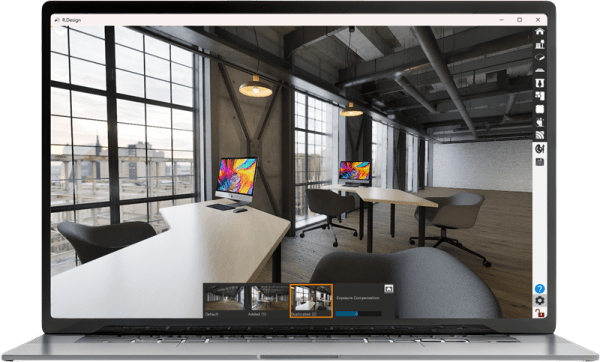
| **Limited to menus necessary for presentation**
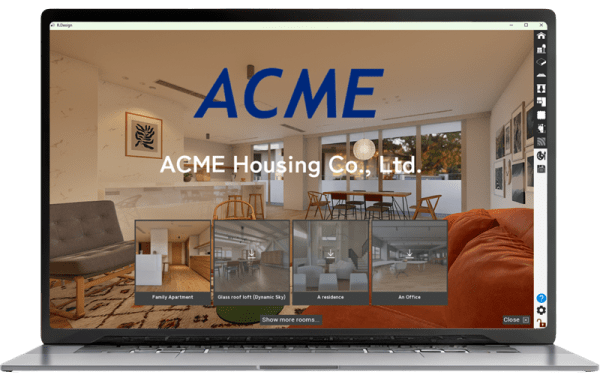
You can display your company name and logo at the top page of presentation mode.
Go to
and check/uncheck the following field.
* Show Company Name & Logo | **Exposes all the detailed menus needed to edit a room**
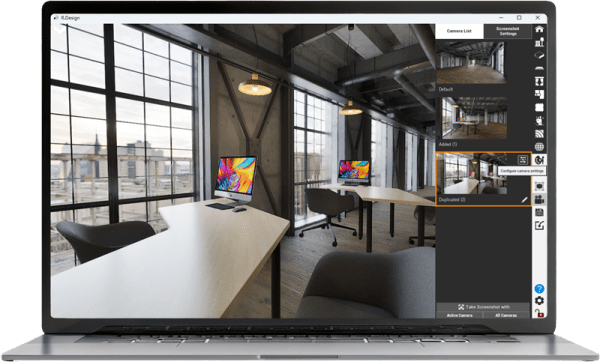
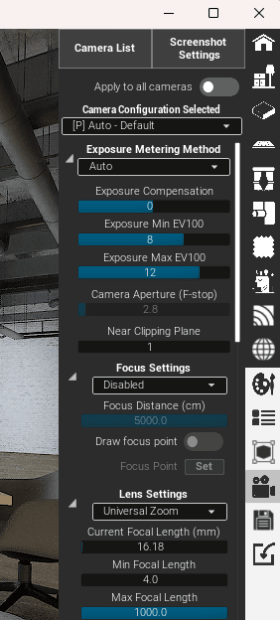
Example) You can duplicate cameras, and configure detailed camera parameters for each camera.
 |
| | |
# Switch the User Interface
At the start of the App, you will be prompted to select either Presentation Mode or Editor Mode.

If you switch the active mode during the play, go to Setting > App UI, and switch your User Interface.

---
**Documents**
- [Links](https://rdesign.getoutline.com/s/b9b8dc8a-cf00-4bca-9731-78df131fd11e/doc/links-ww0nNNFkYv)
- [Let's Get Started](https://rdesign.getoutline.com/s/b9b8dc8a-cf00-4bca-9731-78df131fd11e/doc/lets-get-started-WHF3PWHkyh)
- [How to play - Basics](https://rdesign.getoutline.com/s/b9b8dc8a-cf00-4bca-9731-78df131fd11e/doc/how-to-play-basics-0ZL36E77eR)
- [Load a Room](https://rdesign.getoutline.com/s/b9b8dc8a-cf00-4bca-9731-78df131fd11e/doc/load-a-room-z1ny97ynXT)
- [Style Your Room](https://rdesign.getoutline.com/s/b9b8dc8a-cf00-4bca-9731-78df131fd11e/doc/style-your-room-qr9PlDID23)
- [Control Items](https://rdesign.getoutline.com/s/b9b8dc8a-cf00-4bca-9731-78df131fd11e/doc/control-items-fbIszOlYgo)
- [World](https://rdesign.getoutline.com/s/b9b8dc8a-cf00-4bca-9731-78df131fd11e/doc/world-Mw268wQi8R)
- [Camera](https://rdesign.getoutline.com/s/b9b8dc8a-cf00-4bca-9731-78df131fd11e/doc/camera-iMwVM2zPiy)
- [Render Images/Movie](https://rdesign.getoutline.com/s/b9b8dc8a-cf00-4bca-9731-78df131fd11e/doc/render-imagesmovie-9V6k2f0kOy)
- [Tools](https://rdesign.getoutline.com/s/b9b8dc8a-cf00-4bca-9731-78df131fd11e/doc/tools-kxb1S2zXND)
- [Save & Share](https://rdesign.getoutline.com/s/b9b8dc8a-cf00-4bca-9731-78df131fd11e/doc/save-share-MacNXG4rhc)
- [Settings](https://rdesign.getoutline.com/s/b9b8dc8a-cf00-4bca-9731-78df131fd11e/doc/settings-VomLoweKlj)
- [My Pages](https://rdesign.getoutline.com/s/b9b8dc8a-cf00-4bca-9731-78df131fd11e/doc/my-pages-E7AHQWKYLp)
- [Import your 3D models](https://rdesign.getoutline.com/s/b9b8dc8a-cf00-4bca-9731-78df131fd11e/doc/import-your-3d-models-1CM651z3Xt)
- [Mouse/Keyboard Combinations and Shortcuts](https://rdesign.getoutline.com/s/b9b8dc8a-cf00-4bca-9731-78df131fd11e/doc/mousekeyboard-combinations-and-shortcuts-3yjIWxwFmj)
- [System](https://rdesign.getoutline.com/s/b9b8dc8a-cf00-4bca-9731-78df131fd11e/doc/system-Osaeyqrkui)
- [Getting Best Visual Quality](https://rdesign.getoutline.com/s/b9b8dc8a-cf00-4bca-9731-78df131fd11e/doc/getting-best-visual-quality-ma5SbRDOh8)
- [Trouble Shooting](https://rdesign.getoutline.com/s/b9b8dc8a-cf00-4bca-9731-78df131fd11e/doc/trouble-shooting-Ks3tqDXXb2)
- [Introduction](https://rdesign.getoutline.com/s/b9b8dc8a-cf00-4bca-9731-78df131fd11e/doc/introduction-5Kgd01u0R3)
- [Mac Beta Trial](https://rdesign.getoutline.com/s/b9b8dc8a-cf00-4bca-9731-78df131fd11e/doc/mac-beta-trial-bGgh7vGUcq)